
How to Build REST APIs Using Python and FastAPI
Building APIs has become part of everyday software work, and Python’s ecosystem has finally matured to offer a framework that is both elegant and fast. FastAPI brings together modern Python features, intuitive design, and high performance, making it an ideal choice for developers who want to ship reliable services without wrestling their tools.
In this guide, you’ll build a complete CRUD API for managing a small library catalog. By the end, you’ll have a fully functional service running locally with automatic documentation, type validation, and clean, predictable behavior.
Introduction to FastAPI
FastAPI is a high-performance web framework built on top of Starlette and powered by Python type hints. It offers an API-first development experience that automatically generates OpenAPI schemas, integrates Pydantic models for validation, and encourages clean architecture from the start.
Why developers choose FastAPI:
- High performance: Comparable to Node.js and Go thanks to async I/O.
- Developer friendly: Type hints drive editor autocompletion and interactive API docs.
- Fewer bugs: Pydantic validation catches malformed data before it touches your logic.
- Minimal boilerplate: Clear routing patterns and simple function signatures.
- Standards-based: Full OpenAPI and JSON Schema support for clients and tests.
Before building anything substantial, you’ll set up a lightweight environment and confirm FastAPI is working properly.
Project Setup: The Library API
The project’s goal is simple: expose a small set of REST endpoints to manage books. You’ll create, read, update, and delete entries using nothing more than an in-memory list. This keeps the focus on the API design rather than database configuration.
Start by creating a new directory:
mkdir my-library
cd my-library
Create a Virtual Environment
To keep dependencies isolated and consistent across machines, create a virtual environment. This tutorial uses Python 3.13.
python -m venv .venv
Activate it:
source .venv/bin/activate  # macOS/Linux
.venv\Scripts\activate     # Windows
Once activated, any packages you install will stay contained within this project.
Install FastAPI and Run the First App
Install FastAPI along with the standard extras (which include a development server):
pip install "fastapi[standard]"
Now create a file called main.py and add:
from fastapi import FastAPI

app = FastAPI()

@app.get("/")
def read_root():
    return {"Hello": "World"}
Start the development server:
fastapi dev main.py
Visit http://127.0.0.1:8000 and you’ll see your first response. More importantly, visit http://127.0.0.1:8000/docs — FastAPI automatically generated interactive documentation for your app.
This feature becomes even more powerful once you introduce data models.
Building a Book Model and CRUD Endpoints
With the basic project up, it’s time to build the core of your library service. Everything will live inside main.py so you can inspect how FastAPI organizes routes, models, and validation.
Defining the Book Data Model
FastAPI relies on Pydantic models to validate and serialize data. Add this below your app definition:
from pydantic import BaseModel

class Book(BaseModel):
    id: int
    title: str
    author: str
    year: int
This model defines what a book must contain. FastAPI will use it to:
- validate incoming data
- serialize outgoing responses
- document the schema automatically in
/docs
Creating an In-Memory Store
For learning purposes, a simple list can act as your temporary “database”:
library: list[Book] = []
It’s easy to replace later with a real database once your service grows.
Adding CRUD Endpoints
Now you can implement the core operations: list, create, update, and delete books.
Add the following below your model and store:
from fastapi import HTTPException

@app.get("/books", response_model=list[Book])
def get_books():
    return library

@app.post("/books", response_model=Book, status_code=201)
def create_book(book: Book):
    if any(b.id == book.id for b in library):
        raise HTTPException(status_code=400, detail="Book with this ID already exists.")
    library.append(book)
    return book

@app.put("/books/{book_id}", response_model=Book)
def update_book(book_id: int, updated: Book):
    for index, stored in enumerate(library):
        if stored.id == book_id:
            library[index] = updated
            return updated
    raise HTTPException(status_code=404, detail="Book not found.")

@app.delete("/books/{book_id}", status_code=204)
def delete_book(book_id: int):
    for index, stored in enumerate(library):
        if stored.id == book_id:
            del library[index]
            return
    raise HTTPException(status_code=404, detail="Book not found.")
Each route demonstrates a core FastAPI concept:
- GET returns serialized Pydantic models.
- POST validates request bodies and sets appropriate status codes.
- PUT uses path parameters to locate and update an item.
- DELETE handles empty success responses with status code 204.
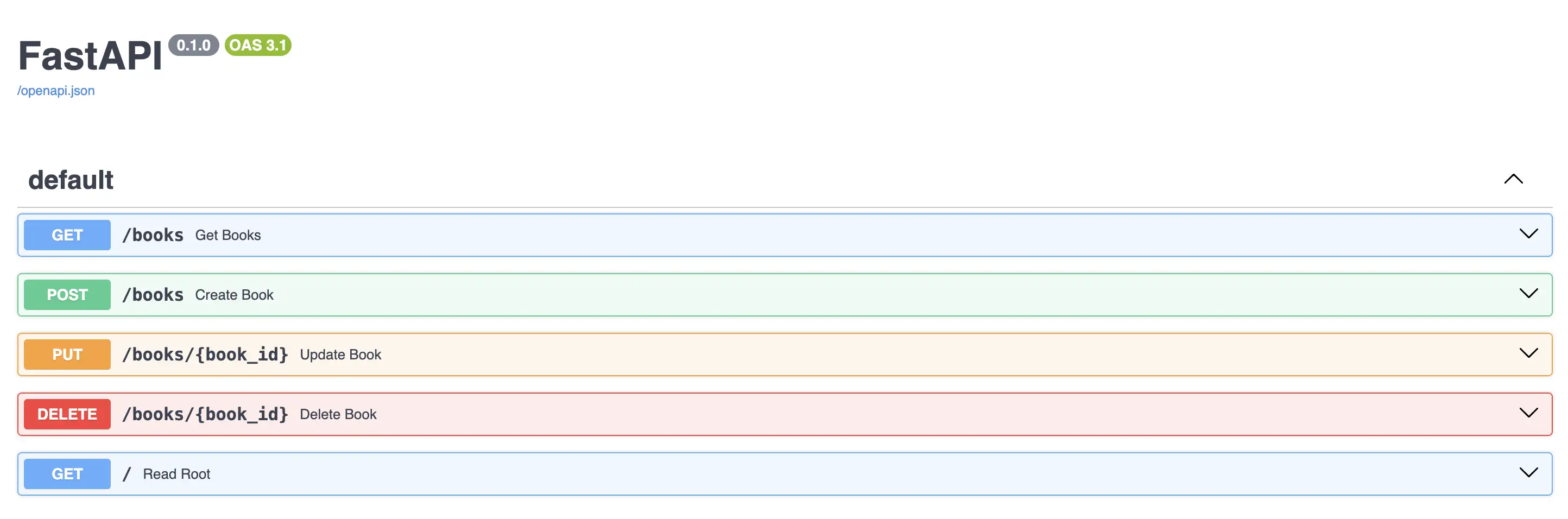
Your interactive docs will now show all four endpoints, complete with request and response schemas generated automatically.
Testing Your API
You can test your new API using curl, Postman, or directly from FastAPI’s interactive docs at:
FastAPI provides a built-in OpenAPI playground where you can execute requests, inspect payloads, and explore schemas without writing a single line of client code.
Final Thoughts
You now have a fully functional REST API powered by FastAPI and Pydantic. More importantly, you’ve seen how little code it takes to build something structured, validated, and automatically documented.
FastAPI scales smoothly from toy projects to production systems, and this small CRUD example is the foundation of nearly every service you’ll build.